Break your videos beautifully.
moshpit is a video editor with a datamosher built in. Cut your clips together, then melt, bloom and glitch them by editing the compressed video itself. Ready for Reels, TikTok and Shorts, up to 4K.
Free and open source. Works in Chrome, Edge, Firefox and Safari, on computers and phones.

A tiny datamosher running right here on your graphics card: it measures how each 16 px block moves and rebuilds every frame from the last one, the way a decoder does. With KEY on, the keyframes at the cuts are dropped, so each new shot melts out of the old picture. The editor does the real thing, to the compressed video.
01How a mosh works
Video files mostly store movement.
A full picture, a keyframe, now and then. In between, only which blocks moved where. Take away the keyframe at a cut and the next shot's movement gets played on the last picture.
Eight frames around a cut, from a real export. I is a full picture; each P only says how blocks move.
Same clips, played back.
Drag across the picture: the clean cut on the left, moshed on the right.
02Effects
33 effects, each with a three-letter name.
Most glitch apps paint over the picture. moshpit's 13 mosh effects rewrite the compressed frames, the way datamoshing was always done; the 20 picture effects finish the look. Pick one.
Keyframe Killer
One shot melts into the next: the new motion paints over the old picture. Start most moshes with this.
Removes I-frames (full pictures). The motion after a missing keyframe lands on the previous image, so one shot melts into the next. This is the base of almost every mosh: put it under the other effects.
Mosh effects13
Rewrite the compressed video itself.
Picture effects20
Work on the decoded picture, on the GPU.
Every effect and setting, in the docs · 26 presets and 32 transitions to start from
03The editor
And around it, a whole editor.
A multi-track timeline with the tools you'd expect from a desktop editor, so you can cut the video you want to break in the same place you break it.
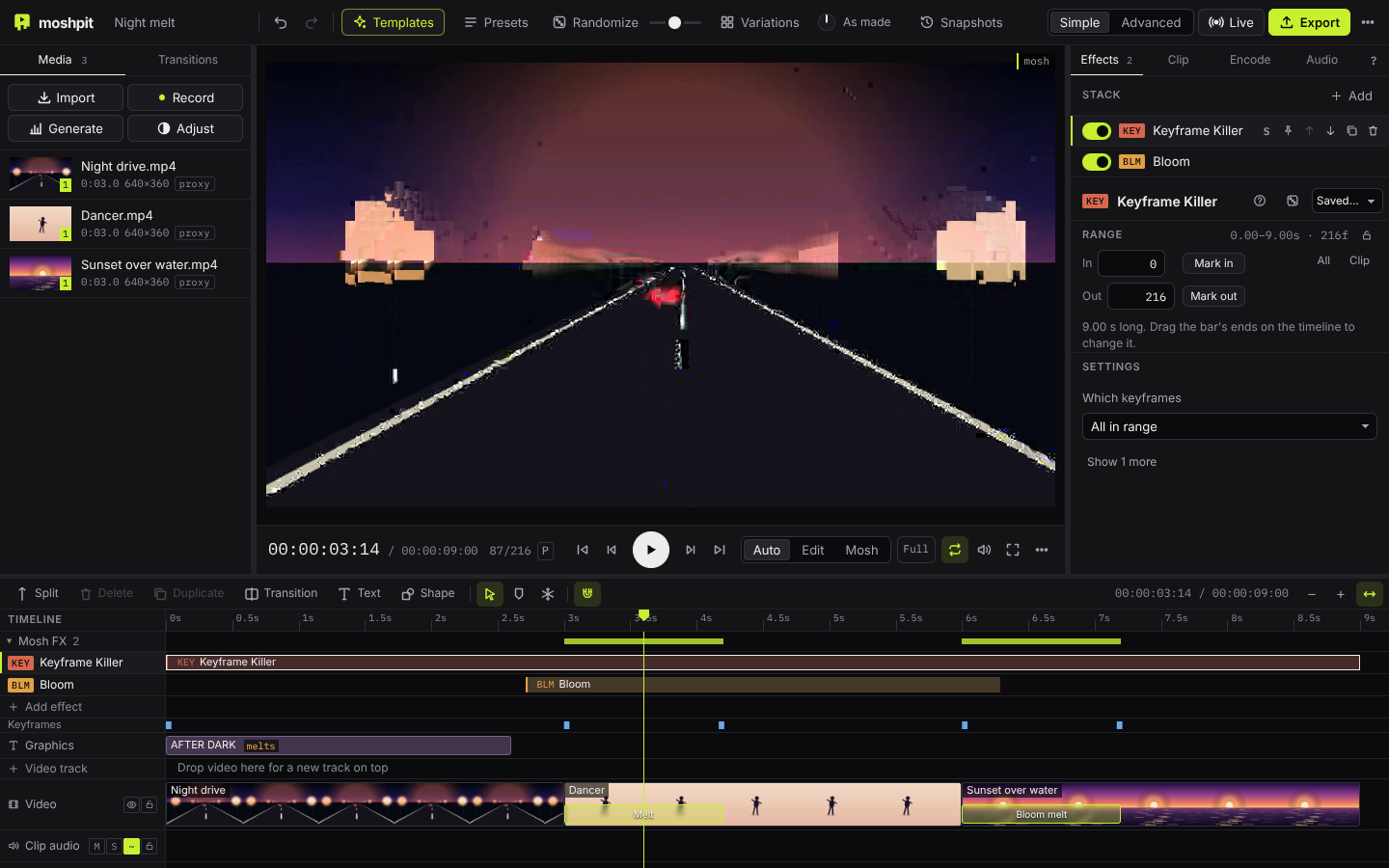
- Media Import video, photos, GIFs and music, record your camera or screen, or generate footage to try things on (city lights, a sunset, a night drive).
- Player Plays your cut straight away from the source files, and the rendered mosh as soon as it's ready.
- Presets, Randomize, Variations 26 presets, a chaos dial and a grid of variations to breed from. Every result has a seed, so you can get it back.
- Inspector Every setting comes with a line explaining what it does.
- Mosh FX lanes Effects are bars on the timeline: drag, resize and stack them, or let them fire on the beat.
- Transitions Melt, Bloom melt, Glitch cut and more on any cut, next to dissolves, wipes, circle and box crops, and a whip that goes the way the picture moves.
- Export MP4, WebM, GIF, PNG frames or the raw broken AVI, up to 4K and 60 fps, with sizes made for Reels, TikTok and Shorts.
- Timeline
- Video and audio tracks, as many as you like. Magnetic main track, ripple trims, blade, slip and roll.
- Clips
- Speed 0.05–16×, speed ramps, reverse, freeze frames, keyframed position, zoom, rotation and opacity, with motion blur on the moves.
- Colour
- Colours kept true from your clip to the file, HDR phone footage brought to normal range, .cube LUTs, chroma key, adjustment layers and scopes.
- Music
- Zoom punches, shakes and speed ramps on the beat, effects that fire on every beat or bar or swell with the bass, and an edit cut to the song for you.
- Tracking
- Follow an object, a face or a flat surface through the shot and pin a title, a shape or a clip to it. One-click stabilize.
- Cut-outs
- Tap a subject and it's followed through the clip, so titles, shapes and other clips can sit behind it. Models run on your device.
- Type and shapes
- Gradient and per-word type, callouts, leader lines, tape, paper and stickers, with shadows and outlines on anything.
- Collage
- Polaroid cards, animated masks, pop-ins on the beat, split screens that swap and fake phone screens that zoom.
- Steal this edit
- Pick a video you like and your clips are cut the same way: its rhythm, frame rate, colours and frame.
- Captions
- Whisper, running on your device. Clean, karaoke, or melting with the mosh. Export .srt or .vtt.
- Live
- Play effects from MIDI knobs and pads, or over OSC in the desktop app, and record the take.
- Output
- Up to 4K (2160×3840 for vertical video) and 60 fps. 10 minutes in the browser, 30 in the desktop app. Vertical crops that follow the action, seamless loops.
04Gallery
Made with moshpit.
Each one comes with its recipe: open it and the same mosh goes onto your own footage. Share yours.
Loading…
Your footage never leaves your device.
- Decoding and encoding
- FFmpeg, as WebAssembly in this tab, or native in the desktop app
- Effects
- WebGL, on your graphics card
- Videos uploaded
- 0
- Account needed
- None. Installable, and works offline.
05Get it
Open it in a tab, or install it.
The desktop app runs a native FFmpeg on every core, so 4K and long videos are practical.
The desktop builds aren't code-signed yet: on macOS right-click the app and choose Open the first time; on Windows choose More info → Run anyway. More about the desktop app.
What is datamoshing?
Video files mostly store changes, not pictures: a full picture now and then (a keyframe) and in between only how blocks of it move. Remove a keyframe and the movement of the next shot gets applied to the old picture, so it melts. Repeat a movement and the picture smears and blooms. Read more.
Is it really free? Are my videos uploaded?
Yes, and no. moshpit is free software (GPL-3.0). Your videos never leave your device: decoding, moshing and encoding all happen in your browser or in the desktop app.
Does it work on my phone?
Yes. Phones get their own editor with a big preview, a swipe-to-scrub timeline and tools that follow what you select. Add it to your home screen to use it like an app.
Can I make Reels, TikToks and Shorts with it?
Yes: that is what most people make. Start from a template, or set the project to 9:16. Made for in Export sets the size (1080×1920, or 2160×3840 for 4K) and shows the apps’ safe zones in the player, zoom punches and shakes land on the beat of your song, and colours and HDR phone footage come out the way they looked.
How long and how big can videos be?
In the browser, up to 10 minutes and comfortably 1080p; 1440p and 4K work for short videos. The desktop app goes to 30 minutes and is much faster at 4K.
Why does the exported AVI look different in every player?
Because a moshed AVI is broken on purpose and every player hides the damage in its own way. MP4, WebM and GIF exports contain exactly what the preview shows.
Can I help?
Please do. Report bugs, suggest features or send code on GitHub, improve a translation, and share what you make in the gallery.
Go break something.
Open moshpit